


GPS Navigation: GPS, Maps
4.139.00 Reviews
App Specs
- Version
- 1.34
- Updated On
- License
- Free
- Downloads
- 500,000+
- Developer
- Averroes Studios
- Categories
- Maps & Navigation
- Platform
- Android
Screenshots

 Analysis by AppCompare
I treat a navigation app as a tool I need to trust at the exact moment a route becomes confusing, not just something to browse before leaving home. GPS Navigation: GPS, Maps is aimed at that practical job: helping me find a route and follow it with spoken directions. My overall impression is that it is approachable for everyday driving, though its usefulness depends on the conditions around the trip as much as on the app itself.
When a route depends on a connection
Navigation can feel effortless while a phone has a steady connection, then become less predictable when that connection weakens. That matters most before a drive, when looking up a destination or adjusting a plan, and during a journey if a route needs refreshing. I would check the route before pulling away rather than waiting until I am already at a junction to enter an address or reconsider the plan.
It is worth separating GPS positioning from internet access in your expectations. A phone may be able to estimate where it is without a strong mobile connection, but finding places, loading route details, or receiving changing traffic information can depend on connectivity. I would not assume every part of the experience continues unchanged in a dead zone. If I know I am heading somewhere with patchy service, I would prepare while I still have a reliable connection and keep a second way to orient myself.
A useful fit for ordinary mobile journeys
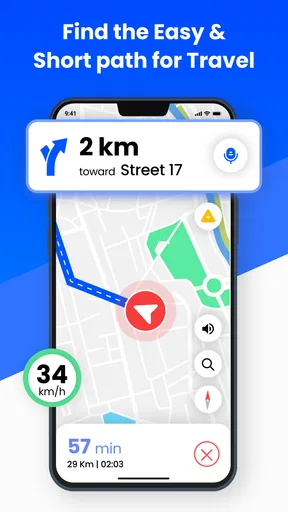
Because this is a Maps & Navigation app, its natural setting is a phone in a car or in a passenger’s hand, not a substitute for planning a complicated expedition. A short drive to an unfamiliar appointment is a good example: I can enter the destination before setting off, start voice guidance, and focus on the road instead of repeatedly checking the screen. The spoken prompts are especially useful when traffic or turns make it awkward to glance down.
It may also suit someone who drives occasionally and wants a straightforward navigation option without paying an upfront price. The app is free to install, is rated for Everyone, and is developed by Appstark Tech. Its average rating is 4.2 from around 600 ratings, while more than 500,000 installs suggest that it has reached a substantial group of Android users. Those figures are useful context, but they cannot tell me whether a particular address, road closure, or local route will be handled well, so I would still check important journeys before relying on it.
For a regular commute, I would use it differently from a one-off trip. I would compare the suggested route with the one I already know, then pay attention to whether the app’s directions are easy to follow at the turns that usually cause trouble. Familiar routes are a practical way to learn how much notice its voice prompts give. If that timing suits me, I can be more confident using it on a new drive; if not, I would keep a familiar navigation alternative ready rather than forcing myself to adapt while moving.
What to do when plans or service change
A navigation app earns its keep when a route stops matching reality. A missed turn, a road closure, or a last-minute change of destination can all leave a driver needing a quick reset. I recommend making changes only after pulling over safely; tapping around while driving is a poor trade-off, even if the interface is simple. If the route does not seem to update, pausing somewhere safe and checking the destination and connection is more sensible than following a confusing sequence of instructions.
Worth Reading Before You Choose

EA SPORTS FC Mobile 26 Is a Bigger Football Game, but It Takes Time

Flipboard Shows What News Apps Must Do Beyond the Feed

Switching to Android Auto Means Rethinking Your Driving Routine

Google Calendar Makes a Crowded Week Easier to Manage

Ludo King Makes the Most of the Minutes Between Plans

Baby Panda World Brings Quick Play to Modern Phones, but Its Game Library Feels Busy
There is also a useful distinction between a route that is wrong and a position estimate that is temporarily off. Tall buildings, enclosed parking areas, and other difficult surroundings can make a phone’s location less precise. In that moment, I would use road signs and visible landmarks as the final authority, then give the phone a little time in a clearer spot before trusting a new instruction. Navigation should reduce uncertainty, not replace attention to the road.
For a longer drive, I would keep the destination details somewhere accessible and make sure the phone has enough battery for the journey. Screen use and spoken guidance can make navigation a drain on a phone, so a charging plan is a simple bit of preparation rather than an advanced trick. I would also avoid starting a route at the last second: setting it up while parked leaves room to correct a misspelled destination or choose the right place when several results look similar.
Using mobile data thoughtfully
If I am trying to limit mobile data, I would handle destination research and route setup while connected to a dependable network, then avoid unnecessary searches during the drive. That is a sensible habit for any connected navigation tool, but it does not guarantee that all route information will remain available without service. Anyone who regularly travels through areas with weak reception should test the app on a familiar route first and should not make an important trip depend on an untested assumption about offline use.
There is a trade-off between convenience and certainty here. A connected route can be more useful when conditions change, while a saved plan, paper directions, or another navigation app can offer reassurance if the phone loses service. I would choose the backup to match the trip: a quick local errand needs little preparation, but a remote destination or a time-sensitive appointment deserves a little more. This is not needless caution; it is a way to keep a minor signal problem from becoming a stressful detour.
How it compares with familiar alternatives
Most people already have a map app they know, so the question is not whether this one can show directions in principle, but whether its flow fits their habits. A familiar alternative may be better if you depend on a particular set of saved places, detailed public-transport planning, or tools you already use across devices. I would not switch a well-tested setup just for novelty. On the other hand, if you want a free, focused option for getting spoken directions on a drive, this app is worth trying on a low-stakes route before making it your default.
GPS Navigation: GPS, Maps is currently at version 1.27 and supports Android 7.0 or later. It includes optional in-app purchases, with listed items ranging from $1.99 to $99.99 each, so I would check the purchase screen carefully before choosing anything beyond the free download. The basic decision is simple: try it first for a familiar journey, see whether the directions and interface suit you, and decide from that experience rather than assuming every feature is essential.
For walkers, cyclists, or travelers who need dependable offline preparation, I would compare alternatives that clearly match those specific needs before setting out. For everyday driving, though, it is reasonable to judge this app by a straightforward test: can I enter a destination, understand the prompts, and recover calmly if I miss a turn? A careful trial tells me more than a star score alone, and it keeps the choice grounded in the kind of trip I actually take.
Getting Started
Jumping into the world of navigation apps can be overwhelming, but GPS Navigation: GPS, Maps makes it a breeze. The installation process was smooth and quick. Once you fire it up, the interface is clean and intuitive. No more fumbling around trying to figure out which button does what. It feels like the app anticipates your needs, which is a refreshing change.
User Experience
When it comes to user experience, this app nails it. The real-time traffic updates are a game changer. If you're like me and hate getting stuck in traffic, you'll appreciate how the app reroutes you with minimal fuss. The voice-guided navigation is clear and precise. It's like having a co-pilot who never gets tired.
One thing I adore is the offline maps feature. This is perfect for those times when you're in a remote area with sketchy internet. You can download maps in advance, ensuring you're never left in the lurch.
Features That Stand Out
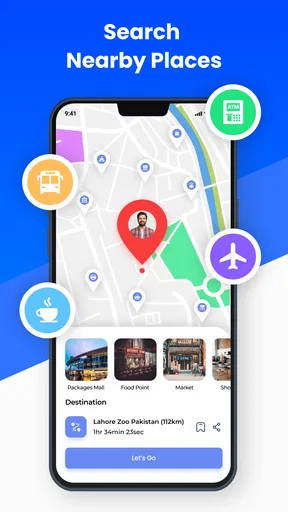
The app comes loaded with features, but a few stand out, making it worth its weight in gold. The point of interest (POI) feature is fantastic. Whether you’re searching for the nearest gas station, hotel, or restaurant, it’s got you covered. No more endless searching on separate apps; everything you need is here.
Another favorite feature of mine is the speed limit alerts. I can't tell you how many times I've been saved from a speeding ticket thanks to these handy reminders. It’s like having a personal assistant keeping you in check.
Design and Functionality
I’ve tried my fair share of navigation apps, and the design of this one is top-notch. It’s aesthetically pleasing without being overwhelming. The colors are easy on the eyes, and the navigation buttons are large enough to tap without error, even when you’re on the move.
Functionality-wise, the app is a powerhouse. It’s stable and doesn’t crash, which is crucial when you’re relying on it to get you from point A to point B.
Personal Experience
On a recent trip, I decided to put the app to the test. I was heading to a new city and used the app from start to finish. I never once felt lost or confused. The app even threw in a few scenic routes, which were a pleasant surprise. It’s not just about getting there; it’s about enjoying the journey.
Wrapping It Up
All in all, GPS Navigation: GPS, Maps is a must-have app for anyone who travels frequently or even occasionally wanders off the beaten path. It's reliable, user-friendly, and packed with features that make life on the road so much easier. If you haven’t tried it yet, do yourself a favor and download it. Trust me, you’ll wonder how you ever navigated without it.
Pros
- Highly accurate location tracking.
- Easy-to-use interface for all users.
- Works offline with downloaded maps.
- Regular updates enhance functionality.
- Customizable route preferences.
Cons
- Consumes significant battery life.
- Occasional ads can be intrusive.
- Requires large storage for offline maps.
- May lag in areas with poor reception.
- Limited support for public transit routes.
FAQs for GPS Navigation: GPS, Maps
What features does the GPS Navigation: GPS, Maps app offer?
The GPS Navigation: GPS, Maps app provides a comprehensive suite of features including real-time traffic updates, voice-guided navigation, offline maps, and route planning. It also offers points of interest like restaurants and gas stations, making it a versatile tool for both daily commutes and long-distance travel.
Is an internet connection required to use this app?
While the GPS Navigation app offers offline maps that you can download for use without an internet connection, some features like real-time traffic updates and map updates require connectivity. It's advisable to download necessary maps in advance to ensure uninterrupted navigation in areas with poor signal.
How accurate is the GPS Navigation: GPS, Maps app?
The app utilizes advanced GPS technology to provide highly accurate location tracking and navigation. Its real-time updates enhance accuracy, especially in urban areas with complex road networks. However, accuracy might be affected in remote areas or locations with limited satellite visibility.
Are there any in-app purchases or subscriptions?
Yes, the GPS Navigation app offers in-app purchases for premium features such as ad-free experience, advanced traffic updates, and additional map options. While the basic version is free, subscribing to premium services can enhance your navigation experience significantly.
How user-friendly is the GPS Navigation: GPS, Maps app?
The app is designed with a clean, intuitive interface that allows users to easily input destinations, access saved routes, and customize settings. Voice-guided directions and clear visual cues make it user-friendly, even for those who may not be tech-savvy. Tutorials and a help section further assist in navigation.


